Mechanical Keyboard Switch Types Explained: Linear, Tactile, and Clicky
- Published on
Mechanical Keyboard Switch Types Explained: Linear, Tactile, and Clicky
If you have spent ten minutes shopping for a mechanical keyboard, you have run into a wall of switch names: red, brown, blue, silent red, speed silver, box white. They sound like paint chips. Underneath the color coding there are really only three families of switch, and once you understand what separates them, the hundred-name catalog collapses into a decision you can make in a couple of minutes.
This is a guide to how the switches themselves work — what is inside them, how they feel, and how to match a type to the way you actually type. If you already know what you want and just need product picks, skip ahead to our mechanical keyboard buying guide. Here we stay on the mechanism.
The Three Switch Types, In One Paragraph
Every mechanical switch is linear, tactile, or clicky. A linear switch presses straight down with no bump and no noise beyond the keycap hitting bottom. A tactile switch has a small bump partway down that you feel when the key registers. A clicky switch adds a sharp audible click on top of that bump. That is the whole taxonomy. The dozens of color names are variations on actuation force and travel inside those three buckets.
| Type | Feel | Sound | Best for |
|---|---|---|---|
| Linear | Smooth, no bump | Quiet (just bottom-out) | Gaming, fast typists who bottom out |
| Tactile | Bump at actuation | Moderate | All-day typing, mixed work |
| Clicky | Bump plus loud click | Loud | People who love the click, solo offices |
What Is Actually Inside a Switch
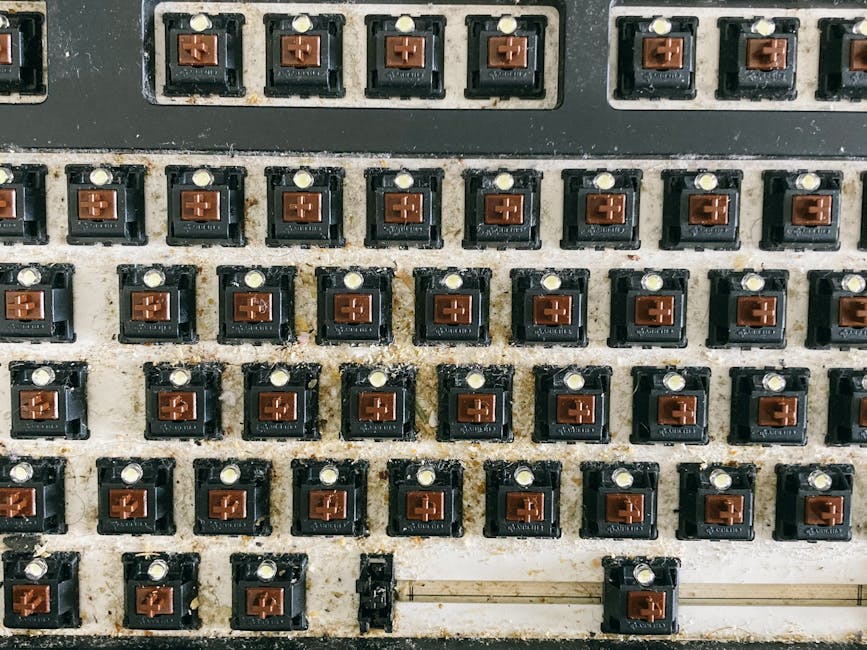
A mechanical switch is a small self-contained mechanism, roughly 15mm tall, that sits under each keycap. Pull a keycap off and you will see four parts that matter:
- The stem — the colored cross-shaped piece that moves up and down. Its shape decides whether you feel a bump. This is the part the keycap clips onto, and the "+" mount is why keycaps are largely interchangeable across brands.
- The spring — sets how much force you need to press the key. A 45g spring feels light; a 67g spring feels firm. This single number is responsible for most of what people describe as a switch being "heavy" or "tiring."
- The housing — the top and bottom shell. The plastic blend here affects sound more than feel; nylon housings sound deeper, polycarbonate brighter.
- The metal leaf — two contact points that close the circuit when the stem pushes them together. The moment they touch is the moment your keypress registers.
That contact point is the source of one number worth knowing: actuation distance. Most switches register somewhere between 1.2mm and 2.0mm into a total travel of about 4mm. Lower actuation means the key fires sooner, which gaming switches lean into and which can cause typos for people with a heavy resting hand.
Linear Switches
Linear switches move down in a single smooth motion. There is nothing to feel except the spring getting slightly firmer and, eventually, the keycap hitting the bottom of the board. Cherry MX Red is the reference point, at roughly 45g actuation force and 2mm actuation distance. Gateron and the in-house switches on most budget boards copy that recipe closely.
People reach for linears for two reasons. Gamers like them because there is no bump to push through, so rapid double-taps feel uninterrupted. And a certain kind of typist — usually someone who bottoms out every key anyway — finds the lack of feedback freeing rather than vague.
The trade-off is that linears give you no signal that a key has registered. If you type lightly and rely on feeling the actuation point, you will overshoot and bottom out constantly, which is louder and harder on the fingers over a long day. Speed variants like Cherry MX Speed Silver shorten actuation to about 1.2mm, which amplifies both the upside and the typo problem.
Tactile Switches
Tactile switches build a small bump into the stem. As you press past the bump, the key registers, and your finger gets a physical "it's done" signal without any added noise. Cherry MX Brown is the famous example, though enthusiasts will tell you its bump is faint; switches like the Boba U4T or Glorious Panda deliver a much more defined bump that a lot of people prefer once they have felt it.
This is the type most all-day typists settle on. The bump lets you stop pressing at actuation instead of slamming to the bottom, which is quieter and easier on the hands. For mixed work — writing, spreadsheets, the occasional game — tactile is the safest default, and it is what I would hand to anyone who is unsure.
The catch is consistency. A weak tactile bump can feel like a slightly gritty linear, which satisfies nobody. This is the one category where the specific switch model matters more than the broad "brown means tactile" shorthand.
Clicky Switches
Clicky switches take the tactile bump and add a separate click mechanism — usually a small jacket or bar inside the housing — that produces a sharp, deliberate click at the actuation point. Cherry MX Blue and Box White are the common ones. The click is the entire appeal: there is a satisfying, typewriter-adjacent rhythm to it that some people genuinely type faster with because the feedback is unmistakable.
The reason clicky switches are a minority taste is obvious the first time you take a video call with one. They are loud enough to be heard across an open office and over a microphone. If you work alone, type for the joy of it, and answer to no one within earshot, clicky switches are wonderful. In almost any shared space they are a liability, and "silent" clicky switches do not exist — the click is the point.
Actuation Force: The Number Behind "Light" and "Heavy"
Within each type, actuation force is the spec that changes the daily experience most. It is measured in grams and usually printed as something like "45g" or "62g."
- 35–45g (light): Fast and low-effort. Great for long typing sessions, but light switches register accidental brushes more easily.
- 50–62g (medium): The middle ground most stock keyboards ship with. Firm enough to avoid accidental presses, light enough to type on all day.
- 65g and up (heavy): Deliberate and controlled. Favored by people who rest their fingers heavily on the keys, and disliked by anyone prone to hand fatigue.
There is no "best" weight — it tracks your hand strength and typing style. If your current keyboard leaves your hands tired, going lighter usually helps more than switching type.
Switch Size and Compatibility
Almost all modern switches use the MX-style stem — the cross-shaped mount Cherry standardized — which is why keycaps from one brand fit switches from another. A switch is roughly 14mm × 14mm at the base and clips into the keyboard's plate or PCB.
The one compatibility split worth knowing is 3-pin vs 5-pin. Five-pin switches have two extra plastic legs that add stability; three-pin switches drop them to fit boards with less mounting room. Five-pin switches work in three-pin boards if you clip the legs, but not the reverse without effort. If you ever plan to swap switches yourself, this is the spec to check.
Hot-Swap: Why It Changed the Calculation
A few years ago, choosing a switch was a permanent decision because the switches were soldered to the board. Hot-swappable keyboards replaced the solder joints with small sockets, so you can pull a switch out with a cheap tool and push a different one in, no soldering required.
This matters for anyone unsure about switch type. On a hot-swap board you can buy a switch tester or a handful of different switches for a few dollars, try them in your actual keyboard, and commit only to what you like. If you are buying your first mechanical keyboard and cannot test in person, a hot-swap board is the single best hedge against picking wrong.
How to Choose, By How You Work
- You game competitively: Linear, light, low actuation. The lack of a bump suits rapid inputs.
- You type all day for work: Tactile, medium weight. The bump saves your hands by letting you stop at actuation.
- You share an office or take calls: Tactile or silent linear. Avoid clicky regardless of how much you like the sound.
- You want to fall in love with typing and work alone: Clicky, or a well-regarded heavy tactile.
- You genuinely do not know: Buy a hot-swap board with tactile switches and a cheap switch tester. Decide with your fingers, not a chart.
Frequently Asked Questions
What are the main types of keyboard switches? There are three: linear (smooth, no bump), tactile (a bump when the key registers), and clicky (a bump plus an audible click). Every named switch — red, brown, blue, and so on — falls into one of these three.
What is the difference between red, brown, and blue switches? Red is the common linear, brown is the common tactile, and blue is the common clicky. The colors are a loose industry convention rather than a strict standard, so check the switch's type and actuation force rather than trusting the color alone.
What does actuation force mean on a switch spec? It is the amount of pressure, measured in grams, needed to register a keypress. Lighter switches (around 45g) take less effort; heavier ones (65g and up) feel firmer and resist accidental presses.
Are all keyboard switches the same size? Physically, nearly all use the MX-style cross stem and the same roughly 14mm footprint, so keycaps are interchangeable. The meaningful difference is 3-pin versus 5-pin mounting, which affects whether a switch drops cleanly into a given board.
Can I change the switches on my keyboard? Only easily if the board is hot-swappable, which uses sockets instead of solder. On a hot-swap board you can replace switches by hand in minutes; on a soldered board it requires desoldering each switch.
Ready to pick an actual board? Our mechanical keyboard buying guide covers layouts, build quality, and wireless options once you know which switch you want.
Related Guides
Keyboard Layouts Explained: Full-Size vs TKL vs 75% vs 65% vs 60%
Keyboard layouts explained: full-size vs TKL vs 75% vs 65% vs 60%. What each size drops, what it keeps, how layers work, and which layout fits how you type and game.
Tablet Buying Guide: iPad vs Android vs Windows, Screen Size Trade-offs, and What Separates Tablets People Actually Use Daily
Tablets vary enormously in software ecosystem, performance consistency, and long-term support. The right choice depends on primary use case, existing device ecosystem, and how long you expect to use the device. This guide addresses the real selection criteria.
Best WiFi Routers 2025: WiFi 6 vs WiFi 6E vs WiFi 7, Asus vs TP-Link vs Netgear vs Eero, Range, Speed, Security, and Mesh vs Single Router
A router upgrade can transform slow or spotty WiFi. This guide explains WiFi 6/6E/7 differences, when a mesh system beats a single router, and the best options for apartments, homes, and power users.